Kanary vs Otter.ai

Should you use Kanary or Otter.ai?

These two solve the same problem from opposite ends. Otter.ai is a shared cloud workspace: recordings land in an account the whole team can search from any browser. Kanary is a macOS app that records, transcribes, and summarises on the machine itself.

This comparison is written by Kanary. The two products overlap, but they are designed around different centres: Otter.ai around a cloud workspace a team shares, Kanary around recording that stays on your own Mac.

Prefer the table? Jump to the comparison
0 bytes
of audio uploaded by default
0 s
spent waiting for a transcript after the call — live captions run during it
0 bots
in the participant list
16 MB
the entire app download (v3.3.3)

Who should choose which

The honest split is not about features, and not about price either — it is about who else needs the recording.

Choose Otter.ai if…

  • Colleagues need to open meetings they were not in — a salesperson reading last week's call, a manager catching up on a missed review
  • Meetings belong in one shared, searchable system of record for the whole team
  • You are fine with recordings living in a cloud account, because that is what makes sharing work

Choose Kanary if…

  • The recordings are essentially yours — interviews, customer calls, one-on-ones, lectures
  • Meeting audio never needs to leave your Mac
  • You would rather not pay per seat, per month, for storage and processing your own Mac can do

Teams do run both: the shared workspace stays the system of record, and the sensitive conversations — legal, personnel, an early acquisition discussion — get recorded locally instead. With Kanary's free tier, that costs less than it sounds.

The three differences that matter

01

Can someone else find the meeting?

Otter.ai keeps recordings where a team can reach them. Kanary keeps them on the Mac that made them.

This is the fork everything else follows from. Otter.ai puts recordings in an account: any teammate can search across meetings from a browser on any operating system, permissions are managed centrally, and the transcript is reachable when your laptop is shut.

Kanary stores recordings on the Mac that made them, syncing between your own Macs over iCloud Drive. There is no shared library and no way to grant a colleague access — not as a missing feature, but as the direct consequence of not uploading anything by default — the only way audio leaves the Mac is iCloud Drive sync you turn on yourself.

If you need the first behaviour, stop reading and use Otter.ai; it is genuinely better at it.
02

What do the free tiers actually get you?

Otter.ai's free tier is metered in hours per month. Kanary's is metered in length per recording.

Otter.ai's free plan gives you about 5 hours of transcription a month, and each meeting is transcribed for the first 30 minutes only — an hour-long call loses its second half. Past either limit, you are on a paid seat.

Kanary's free tier does not meter hours at all, because nothing is being processed on someone else's servers — it limits how much of a single recording gets transcribed and summarised (1 hour 15 minutes), and the paid tier removes that limit.

Check the per-meeting cap too: it applies to one continuous call, so for an all-day planning session or a long workshop, transcription stops partway through. Kanary compresses audio in the background as it records, so a three-hour all-hands is an ordinary case, and if the disk starts filling the recording is stopped safely rather than lost.

03

What running locally gives you

Kanary records the Mac rather than the meeting. Everything below follows from that one decision.

  • Japanese subtitles appear while the English sentence is still being spoken
  • Works on a plane, with no connection and no account
  • Your voice and everyone else's are recorded as two separate tracks
  • No bot in the participant list, and no one to admit
  • Google Meet, Zoom, Teams, FaceTime, Discord, WhatsApp and LINE, with no per-service setup
  • Drag in a .mov or .mp4 and the audio is extracted and treated like any other recording
  • Cue hands the in-progress transcript straight to Claude, Codex, or Cursor
  • When a call starts using the microphone, Kanary offers to record it in one click

Some things are not a matter of engineering effort — a cloud service has to upload, process, and return, and that round trip is the product. Because Kanary reads the speaker output directly on the Mac, there is no round trip to wait for.

The same locality is why your own voice never blends into the room: the microphone and the speaker are captured as two separate tracks, so your side and theirs are apart before any model gets involved.

It also reaches conversations a bot cannot. A bot only attends meetings it can be invited to, and the calls that matter most are often the ones nobody sends an invitation for.

EnglishJapaneseRecording

Live captions during an English meeting, translated to Japanese as each sentence is spoken — no upload, no delay.

Side by side

For reference. Figures come from the vendor’s own pages; any figure checked on a different date is marked in the row.

Otter.ai’s figures were last checked against its own pages on August 28, 2026. Third-party “alternatives” articles are not used as sources — including this one. Items we could not verify against a primary source are left out of the table entirely, whichever side they would favour.

Swipe sideways to see both columns

Key differencesKanaryOtter.ai
Free planFree, permanentlyFree (as of August 26, 2026)
Free transcription allowanceNo monthly cap — 1 h 15 m per recording on the free tier300 minutes per month (as of August 26, 2026)
Free file importsNo cap — drag in .mov or .mp4 and the audio is extracted3 imports lifetime total (as of August 26, 2026)
Transcription languagesJapanese, English, Chinese, Cantonese, Korean, German, French, Spanish, Italian, PortugueseEnglish, Spanish, French, German, Japanese, Chinese (Simplified) (as of July 23, 2026)
Export formatsMarkdown, SRTMP3, TXT, PDF, DOCX, SRT (as of July 23, 2026)
Shared team libraryNone — iCloud sync between your own Macs onlyYes
Devices and platformsmacOS 26 Tahoe or later, Apple Silicon onlyMac, Windows, iPhone / Android, browser
Business integrationsNone — CLI and Markdown / SRT export insteadSalesforce, HubSpot, Slack, Notion, Jira, and more
Meeting apps coveredNo list — anything that plays on your MacZoom, Google Meet, Microsoft Teams, Slack Huddles
Recording without a botAlways — nothing joins the callDesktop app only (Zoom, Google Meet, Slack Huddles)
Where audio is processedOn your MacTheir servers (as of July 23, 2026)

Where Otter.ai is the better choice

Each of these follows from recording on-device — stated plainly, because finding out after installing is worse. If one of them describes you, Otter.ai is the right answer today, and this page has done its job.

  • Someone reviews meetings they did not attend — a sales manager coaching from call recordings, a new hire learning from past customer conversations, a handover, call QA. That work needs a shared workspace.
  • Notes need to land in Salesforce, HubSpot, or Zapier — Otter connects to them directly.
  • You are buying for an organisation: SSO, SCIM, admin logs, usage analytics, and HIPAA as an add-on are all there.
  • Your machine is outside Kanary’s requirements — Otter also runs on Windows, iPad, older Macs, and in the browser (Kanary needs macOS 26 Tahoe on Apple Silicon).
  • You want the summarising done off your own machine — useful on a busy laptop, or when long meetings run back to back.

Plenty of people also run both: the shared meetings go to Otter.ai, the sensitive ones stay on the Mac.

Trade-offs and limitations

Kanary

  • Needs macOS 26 Tahoe or later on Apple Silicon

    No Windows, iPad, Intel Mac, or browser version

  • No shared team library

    A colleague cannot open a meeting they were not in

  • No Salesforce, HubSpot, or Zapier integrations

    And no admin console or SSO

  • Transcription and summarising use your own Mac’s processor

Otter.ai

  • Audio is uploaded to and stored on its servers

    As part of normal use, not as an option you turn on

  • The free plan is capped

    Both monthly and per meeting

  • Some capture methods put a bot in the meeting

    Which needs guest admission

  • Team use is priced per seat, per month

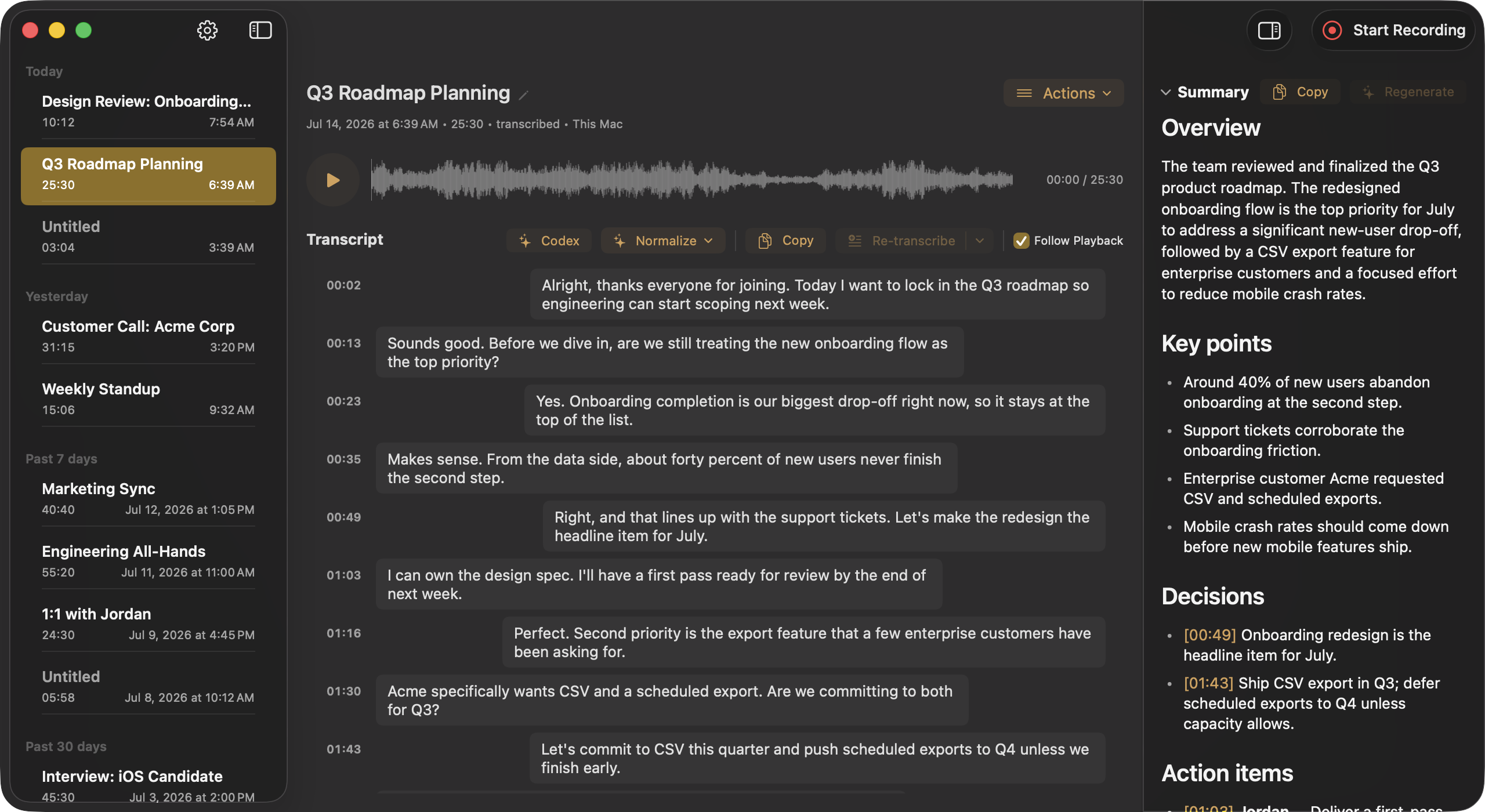
Kanary Recordings window on macOS
The recording library: transcript, structured summary, and both audio tracks in one window.

Every word.
Yours to keep.

Free to download. Records and transcribes quietly in your menu bar.

Download for macOSmacOS 26 Tahoe or later · Apple Silicon