Kanary vs Notta

Should you use Kanary or Notta?

Notta now offers both a shared cloud workspace and paid Privacy Mode, which records and transcribes locally. Kanary is local-first by default: recording, live transcription, translation, and summarising run on the Mac without switching to a reduced offline workspace.

This comparison is written by Kanary. Notta’s new local option materially changes the comparison, so this page separates its Cloud Mode from its paid Privacy Mode instead of treating Notta as cloud-only.

Prefer the table? Jump to the comparison
0 bytes
of audio uploaded by default
0 s
spent waiting for a transcript after the call — live captions run during it
0 bots
in the participant list
16 MB
the entire app download (v3.3.3)

Who should choose which

The honest split is not about features, and not about price either — it is about who else needs the recording.

Choose Notta if…

  • You need both a team cloud workspace and an optional local transcription mode in one product
  • You need Windows, mobile, browser access, or transcription beyond Kanary’s ten languages
  • You accept that local Privacy Mode is paid and pauses or limits cloud AI summaries, sync, and collaboration

Choose Kanary if…

  • Local recording, live transcription, translation, and summarising should be the normal workflow, not a separate mode
  • You need local use without an account or periodic licence validation
  • You want local live translation and summarising, plus captions and Cue, without leaving the local workflow

Notta is stronger as one system spanning team-cloud and local transcription. Kanary is narrower: a Mac-first local workflow whose core recording and AI features keep working together offline.

The four differences that matter

01

Local is no longer the dividing line

Notta Privacy Mode and Kanary can both keep recording and transcription on the computer.

Notta Privacy Mode processes recording and transcription on-device and saves the result only in a local folder. After its offline model and licence are set up, it can work without a connection for at least a month between periodic licence checks.

The difference is the product boundary. Privacy Mode is a paid, app-wide workspace in Notta Desktop. Cloud AI summaries, cross-device sync, and team collaboration are paused or limited there. Kanary makes local recording, live transcription, translation, and summarising the normal workflow rather than a reduced mode.
02

Who actually goes to the meeting?

Notta Bot can attend and record for you. Kanary gets you into the meeting, then leaves recording under your control.

Connect Google Calendar or Microsoft Outlook to Notta and its Bot can automatically join scheduled Zoom, Google Meet, Microsoft Teams, and Webex calls as a participant. You can filter auto-join by platform, internal or external meeting, title keywords, or individual event, and the Bot can record while you are absent. The meeting still has to admit it and grant recording permission.

Notta Desktop offers a separate bot-free path: it detects a meeting and prompts the person at the computer to record. That workflow should not be confused with calendar auto-join; the calendar automation uses Notta Bot.

Kanary reads the calendars already synced to your Mac — including iCloud, Google, and Exchange — and opens the meeting link one minute before it starts. It never joins as another participant or records in your absence. Notta offers the unattended delegate; Kanary keeps attendance and recording attached to the person at the Mac.

03

Free cloud use versus paid local use

Notta has a free plan, but its local Privacy Mode starts on Pro. Kanary’s local workflow starts free.

Notta Free includes 120 transcription minutes per month and transcribes only the first 3 minutes of each recording. Privacy Mode is available on Pro, Business, and Enterprise and does not consume cloud transcription minutes.

Kanary’s free tier has no monthly transcription quota. It limits each recording to 1 hour 15 minutes of transcription and summarising; the paid tier removes that per-recording limit.

04

What stays available while you stay local

Notta offers a choice between its richer cloud workflow and a narrower local workspace. Kanary keeps its core workflow local together.

  • Notta Privacy Mode: local recording, post-recording transcription, local file import, review, and export
  • Notta Cloud Mode: AI summaries, cross-device sync, team collaboration, integrations, and the shared workspace
  • Kanary locally: live transcription, live translation, summaries, captions, and Cue in the same workflow
  • Notta requires an account and roughly monthly licence validation; Kanary’s local features do not require an account

Notta local records do not automatically move into its cloud workspace. To use cloud features, you export the local file and re-import it in Cloud Mode.

That makes Notta the broader product and Kanary the more integrated local one. Choose based on whether you need one product that can switch between cloud and local, or a local-first workflow whose AI features remain available together.

EnglishJapaneseRecording

Live captions during an English meeting, translated to Japanese as each sentence is spoken — no upload, no delay.

Side by side

For reference. Figures come from the vendor’s own pages; any figure checked on a different date is marked in the row.

Notta’s figures were last checked against its own pages on September 1, 2026. Third-party “alternatives” articles are not used as sources — including this one. Items we could not verify against a primary source are left out of the table entirely, whichever side they would favour.

Swipe sideways to see both columns

Key differencesKanaryNotta
Free planFree, permanentlyFree
Free transcription allowanceNo monthly cap — 1 h 15 m per recording on the free tier120 minutes per month
Free file importsNo cap — drag in .mov or .mp4 and the audio is extracted50 imports per month
Transcription languagesJapanese, English, Chinese, Cantonese, Korean, German, French, Spanish, Italian, Portuguese58 languages
Export formatsMarkdown, SRTTXT, DOCX, SRT, PDF, XLSX, MP3
Shared team libraryNone — iCloud sync between your own Macs onlyYes
Devices and platformsmacOS 26 Tahoe or later, Apple Silicon onlyMac (macOS 11+; system audio 13+), Windows 10+, iPhone / Android, browser
Business integrationsNone — CLI and Markdown / SRT export insteadSalesforce, HubSpot, Slack, Notion, Zapier, and more
Meeting apps coveredNo list — anything that plays on your MacZoom, Google Meet, Microsoft Teams, Webex, or any meeting software via Desktop
Calendars connectedCalendars synced to the Mac — iCloud, Google, Exchange, and moreGoogle Calendar and Microsoft Outlook
At meeting timeOpens the meeting link 1 minute before — never records unattendedA bot can join and record as a participant, even without you
Recording without a botAlways — nothing joins the callDesktop app — any meeting software or browser
Where audio is processedOn your MacCloud, or on-device in paid Privacy Mode

Where Notta is the better choice

Each of these follows from recording on-device — stated plainly, because finding out after installing is worse. If one of them describes you, Notta is the right answer today, and this page has done its job.

  • You want one product that can switch between a team cloud workspace and paid local transcription. Notta Privacy Mode keeps recordings and transcripts on the device, while Cloud Mode provides sharing, sync, and integrations.
  • You want bot-free capture on almost any meeting app while keeping microphone and system audio separate. Notta Desktop supports both, and can prompt when a meeting starts.
  • Someone reviews meetings they did not attend — a manager reading last week’s client call, a handover, call QA. The Business-plan workspace lets members open and collaborate on each other’s recordings.
  • Your machine is outside Kanary’s requirements — Notta runs on Windows, iPhone / Android, in any browser, and its desktop app reaches back to macOS 13 (Kanary needs macOS 26 Tahoe on Apple Silicon).
  • You transcribe languages beyond Kanary’s ten — Notta covers 58, including Vietnamese, Thai, Hindi, and Indonesian.
  • You need a recording of a meeting you cannot attend — bot mode joins the call and records the full meeting, video included, without you there.
  • Notes need to land in Salesforce, HubSpot, Slack, Notion, or Zapier — Notta connects to them directly.
  • You want transcription and summarising done off your own machine. Notta Cloud Mode handles both remotely; Privacy Mode is the alternative when local control matters more.

Plenty of people also run both: the shared meetings go to Notta, the sensitive ones stay on the Mac.

Trade-offs and limitations

Kanary

  • Needs macOS 26 Tahoe or later on Apple Silicon

    No Windows, iPad, Intel Mac, or browser version

  • No shared team library

    A colleague cannot open a meeting they were not in

  • No Salesforce, HubSpot, or Zapier integrations

    And no admin console or SSO

  • Transcription and summarising use your own Mac’s processor

Notta

  • Local Privacy Mode requires a paid plan

    Pro, Business, or Enterprise, with sign-in and periodic licence validation

  • Privacy Mode pauses or limits cloud AI summaries, sync, and collaboration

    Local files must be exported and re-imported manually to use cloud workflows

  • The free cloud plan transcribes only 3 minutes per recording

    And 120 transcription minutes per month in total

  • Local language coverage depends on the installed engine

    4 languages in the general offline model; 11 through Apple Speech Analyzer on macOS 26+

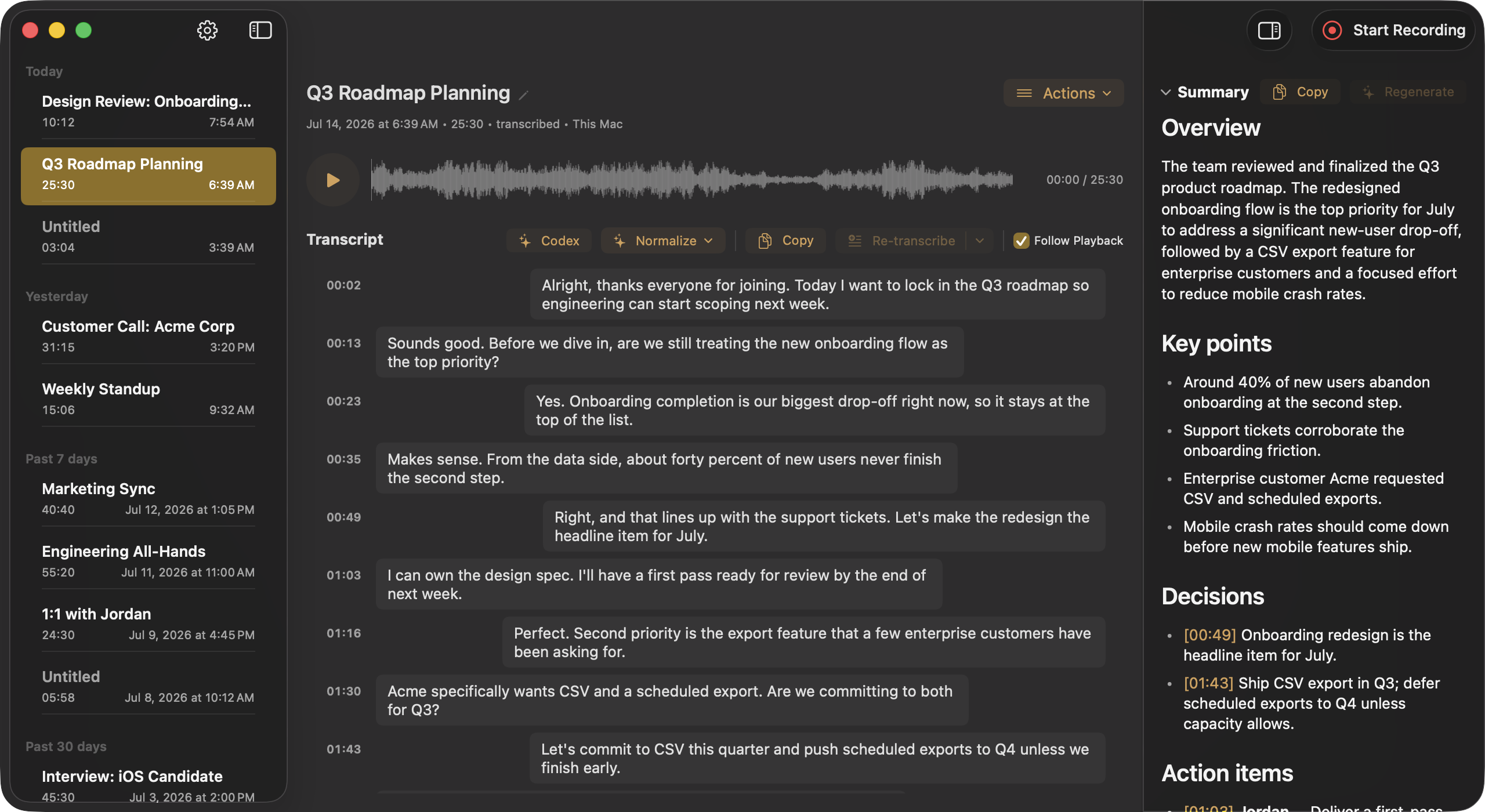
Kanary Recordings window on macOS
The recording library: transcript, structured summary, and both audio tracks in one window.

Every word.
Yours to keep.

Free to download. Records and transcribes quietly in your menu bar.

Download for macOSmacOS 26 Tahoe or later · Apple Silicon